How to verify webhook signature
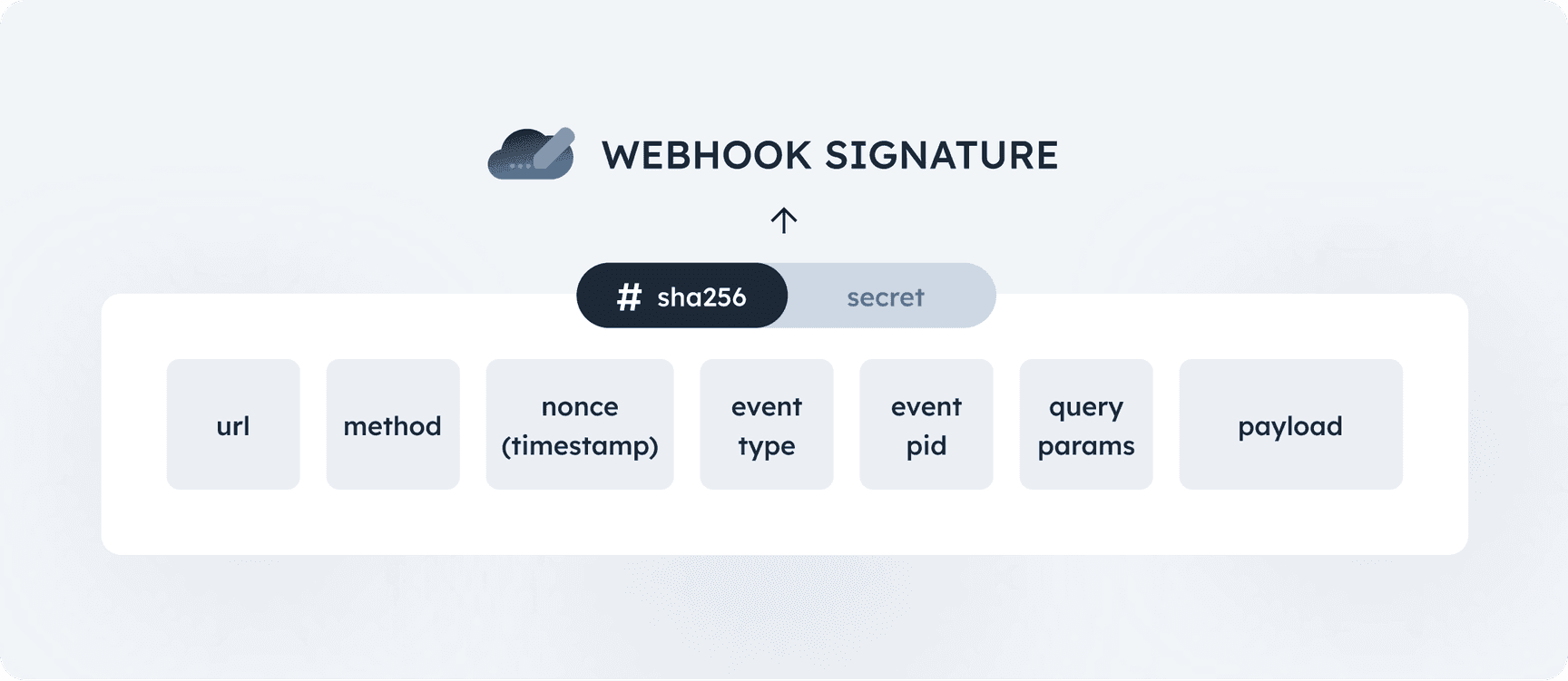
Overview
- Absolute request URL (without query parameters): The full URL of the request, excluding any query parameters (e.g.
https://example.com/webhook/handler). - Uppercase request method: The HTTP method used for the request (e.g., POST, GET, PUT, DELETE), written in uppercase.
- Timestamp: The current timestamp in microseconds (taken from
WEBHOOK-REQUEST-TIMESTAMPrequest header). - Event type: Request event type (taken from
WEBHOOK-REQUEST-EVENT-TYPErequest header). - Event PID: Event public ID (taken from
WEBHOOK-REQUEST-EVENT-PIDrequest header). - Query parameters (encoded in JSON canonical form - RFC 7159):
- The query parameters must be encoded in JSON canonical form.
- The order of JSON key-value pairs is critical. Ensure the keys are sorted correctly to match the canonical form.
- All query parameter keys and values must be of string type.
- If there are no query parameters, use an empty string.
- Payload (encoded in JSON canonical form - RFC 7159):
- The payload must be encoded in JSON canonical form.
- The order of JSON key-value pairs is critical. Ensure the keys are sorted correctly to match the canonical form.
- If there is no payload, use an empty string.
- If the payload contains a file object, use the SHA-256 hash of the file content to create the canonical form for the request descriptor.
- Webhook secret: Secret taken from the developer panel.
Example code
import hashlibimport canonicaljson

def sign_webhook(    url,    method,    nonce,    eventType,    eventPID,    webhookSecret,    query_params=None,    payload=None,):    hash_elems = [        url,        method,        nonce,        eventType,        eventPID,        canonicaljson.encode_canonical_json(query_params).decode()        if query_params        else "",        canonicaljson.encode_canonical_json(payload).decode() if payload else "",        webhookSecret,    ]
    return hashlib.sha256(("".join([elem for elem in hash_elems])).encode()).hexdigest()

signature = sign_webhook( "https://example.com/webhook/path", "POST", "1739926662538", "transaction.created", "AH0867T9UUW61JXT", "ws_A4OC2WMTNVUS2Q3DAED0JMHX3QK8CJUG7Z6BG71GQ41JU6JTPWRPD5RWYNFS8", { "param1": "abc", "param2": "123"}, { "account_pid": "SOXKOXRPNU3H51T0", "added": "1739926645.229513", "amount": 600, "currency": "EUR", "fee": 0, "kind": "DEBIT", "pid": "7C7Y2WH6A0752IDH", "recipient": { "address": "Example address", "city": "Helsinki", "country": "FI", "name": "Second Account", "number": "FI3379600112347627", "zip_code": "54321", }, "remittance_information": {"ustrd": "Test transfer"}, "sender": { "address": "Example address", "city": "Helsinki", "country": "FI", "name": "Example User", "number": "FI4279600195333487", "zip_code": "12345", }, "source": "WEB", "status": "PENDING", },)print("Webhook signature is", signature)Playground
Request details
See below for step-by-step explanation
6936d3cca9f93be1967f17addb241a00a5a4a7f3472d8c1820c8e20ac6a83062Step-by-Step Explanation
1. Get absolute request URL
Remove any query parameters from the full URL of the request.Explanation:
Removing query parameters from https://example.com/webhook/path?param1=abc¶m2=123 results in https://example.com/webhook/path
String:
https://example.com/webhook/path2. Concatenate method
The HTTP method (e.g., POST, GET) is concatenated with the string.Explanation:
Concatenate method: POST
String:
https://example.com/webhook/pathPOST3. Concatenate timestamp
Timestamp taken from request header WEBHOOK-REQUEST-TIMESTAMP is concatenated with the string.Explanation:
Concatenate timestamp: 1739926662538
String:
https://example.com/webhook/pathPOST17399266625384. Concatenate event type
Concatenate event type taken from request header WEBHOOK-REQUEST-EVENT-TYPE with the string.Explanation:
Concatenate nonce: transaction.created
String:
https://example.com/webhook/pathPOST1739926662538transaction.created5. Concatenate event PID
Concatenate event PID taken from request header WEBHOOK-REQUEST-EVENT-PID with the string.Explanation:
Concatenate nonce: AH0867T9UUW61JXT
String:
https://example.com/webhook/pathPOST1739926662538transaction.createdAH0867T9UUW61JXT6. Concatenate query parameters (if present)
If there are query parameters in the URL, convert them to canonical JSON format and concatenate the result to the string.Canonical Form: The query parameters must be in stringified JSON form, ensuring they are sorted and structured correctly. Every value should be a string here.Explanation:
Query parameters in canonical JSON format: {"param1":"abc","param2":"123"}
String:
https://example.com/webhook/pathPOST1739926662538transaction.createdAH0867T9UUW61JXT{"param1":"abc","param2":"123"}7. Concatenate payload (if present)
If the request includes a payload (usually for POST or PUT requests), it is also concatenated with the string.The payload must also be in canonical JSON format, meaning properly stringified with keys in the correct order and all data types correct.:Explanation:
Payload in canonical JSON format: {"account_pid":"SOXKOXRPNU3H51T0","added":"1739926645.229513","amount":600,"currency":"EUR","fee":0,"kind":"DEBIT","pid":"7C7Y2WH6A0752IDH","recipient":{"address":"Example address","city":"Helsinki","country":"FI","name":"Second Account","number":"FI3379600112347627","zip_code":"54321"},"remittance_information":{"ustrd":"Test transfer"},"sender":{"address":"Example address","city":"Helsinki","country":"FI","name":"Example User","number":"FI4279600195333487","zip_code":"12345"},"source":"WEB","status":"PENDING"}
String:
https://example.com/webhook/pathPOST1739926662538transaction.createdAH0867T9UUW61JXT{"param1":"abc","param2":"123"}{"account_pid":"SOXKOXRPNU3H51T0","added":"1739926645.229513","amount":600,"currency":"EUR","fee":0,"kind":"DEBIT","pid":"7C7Y2WH6A0752IDH","recipient":{"address":"Example address","city":"Helsinki","country":"FI","name":"Second Account","number":"FI3379600112347627","zip_code":"54321"},"remittance_information":{"ustrd":"Test transfer"},"sender":{"address":"Example address","city":"Helsinki","country":"FI","name":"Example User","number":"FI4279600195333487","zip_code":"12345"},"source":"WEB","status":"PENDING"}8. Concatenate webhook secret
Concatenate secret from the developer panel to the string.String:
https://example.com/webhook/pathPOST1739926662538transaction.createdAH0867T9UUW61JXT{"param1":"abc","param2":"123"}{"account_pid":"SOXKOXRPNU3H51T0","added":"1739926645.229513","amount":600,"currency":"EUR","fee":0,"kind":"DEBIT","pid":"7C7Y2WH6A0752IDH","recipient":{"address":"Example address","city":"Helsinki","country":"FI","name":"Second Account","number":"FI3379600112347627","zip_code":"54321"},"remittance_information":{"ustrd":"Test transfer"},"sender":{"address":"Example address","city":"Helsinki","country":"FI","name":"Example User","number":"FI4279600195333487","zip_code":"12345"},"source":"WEB","status":"PENDING"}ws_A4OC2WMTNVUS2Q3DAED0JMHX3QK8CJUG7Z6BG71GQ41JU6JTPWRPD5RWYNFS89. Create a SHA-256 hash of the concatenated string
The concatenated string is hashed using the SHA-256 algorithm.String:
6936d3cca9f93be1967f17addb241a00a5a4a7f3472d8c1820c8e20ac6a8306210. Verify signature
Make sure that the resulting signature matches value present in the request header WEBHOOK-REQUEST-SIGNATURE.
