How to generate API request signature
Overview
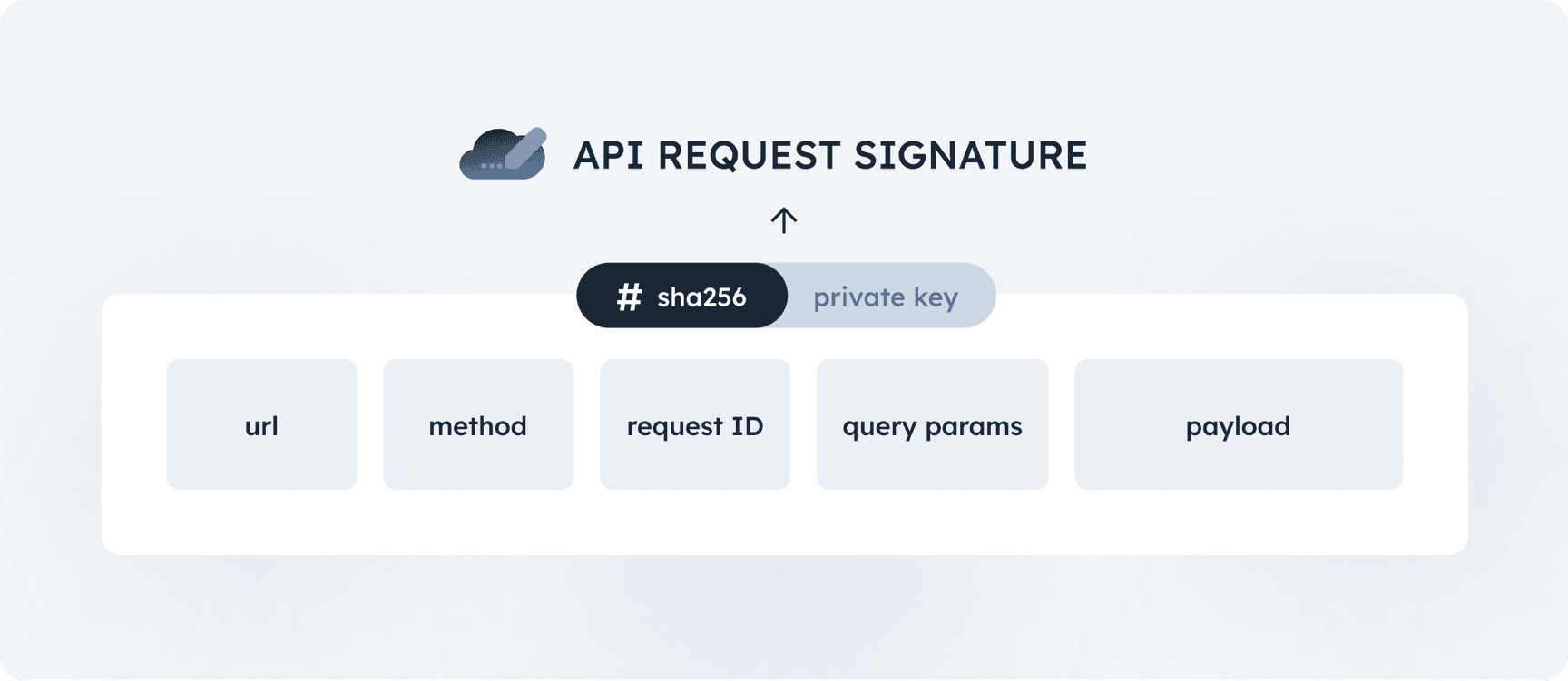
The request signature is generated by computing the SHA-256 hash of concatenated and signed items below (referred to as the request descriptor):
- Absolute request URL (without query parameters): The full URL of the request, excluding any query parameters (e.g.
https://api.narvi.com/rest/v1.0/transactions/create). - Uppercase request method: The HTTP method used for the request (e.g., POST, GET, PUT, DELETE), written in uppercase.
- Request ID: Valid UUID or timestamp, it can't be duplicated across requests.
- Query parameters (encoded in JSON canonical form - RFC 7159):
- The query parameters must be encoded in JSON canonical form.
- The order of JSON key-value pairs is critical. Ensure the keys are sorted correctly to match the canonical form.
- All query parameter keys and values must be of string type.
- If there are no query parameters, use an empty string.
- Payload (encoded in JSON canonical form - RFC 7159):
- The payload must be encoded in JSON canonical form.
- The order of JSON key-value pairs is critical. Ensure the keys are sorted correctly to match the canonical form.
- If there is no payload, use an empty string.
- If the payload contains a file object, use the SHA-256 hash of the file content to create the canonical form for the request descriptor.
Example code
1234567891011121314151617181920212223242526272829303132333435363738394041424344454647484950515253
import base64import hashlibimport canonicaljsonimport datetimeimport uuid
from cryptography.hazmat.primitives.asymmetric import ecfrom cryptography.hazmat.primitives import hashes, serialization
def load_private_key(pem_data):    return serialization.load_pem_private_key(        pem_data,        password=None    )
def sign_request(private_key, url, method, request_id, query_params=None, payload=None):    hash_elems = [url, method, request_id]
    if query_params:        hash_elems.append(canonicaljson.encode_canonical_json(query_params).decode())
    if payload:        hash_elems.append(canonicaljson.encode_canonical_json(payload).decode())
    descriptor = hashlib.sha256(("".join([elem for elem in hash_elems])).encode()).digest()    signature = private_key.sign(descriptor, ec.ECDSA(hashes.SHA256()))    return base64.b64encode(signature).decode('utf-8')
# read your private key PEM (eg. from file)private_key_pem = b"""-----BEGIN EC PRIVATE KEY-----MHcCAQEEIJG0K4mHabOytzUoHxXwNSRd6JlFW3CulozZKA77RKj2oAoGCCqGSM49AwEHoUQDQgAEWHzPgCkPDKPZ/wCqd7cDj+Bi2P6vk4A/qit/yGjgBKNnZB4QA+ytgq9SJ386/G0Muzqa9k8wbnUe4iQgkp1qgw==-----END EC PRIVATE KEY-----"""
private_key = load_private_key(private_key_pem)
request_url = "https://api.narvi.com/rest/v1.0/transactions/list"request_method = "GET"request_id = str(uuid.uuid4())request_query_params = {    "account_pid": "1234",    "kind": "CREDIT"}
request_signature = sign_request( private_key, request_url, request_method, request_id, request_query_params)print("Request signature is", request_signature)Playground
Private key
12345
-----BEGIN PRIVATE KEY-----MIGHAgEAMBMGByqGSM49AgEGCCqGSM49AwEHBG0wawIBAQQgkbQriYdps7K3NSgfFfA1JF3omUVbcK6WjNkoDvtEqPahRANCAARYfM+AKQ8Mo9n/AKp3twOP4GLY/q+TgD+qK3/IaOAEo2dkHhAD7K2Cr1Infzr8bQy7Opr2TzBudR7iJCCSnWqD-----END PRIVATE KEY-----Request details
Signature
See below for step-by-step explanation
MEYCIQC8nU9WYlY9x7VS0CHFPJhq72VZcalqhQNgQwigezORygIhALwxLCpCZ5avvZITkcAF1uhI7bgaBOpuRKJspb8+dboqStep-by-Step Explanation
1. Get absolute request URL
Remove any query parameters from the full URL of the request.2. Concatenate method
The HTTP method (e.g., POST, GET) is concatenated with the string.3. Concatenate request ID
The request ID (valid UUID, can't be duplicated across requests) is concatenated with the string.4. Concatenate query parameters (if present)
If there are query parameters in the URL, convert them to canonical JSON format and concatenate the result to the string.Canonical Form: The query parameters must be in stringified JSON form, ensuring they are sorted and structured correctly. Every value should be a string here.5. Concatenate payload (if present)
If the request includes a payload (usually for POST or PUT requests), it is also concatenated with the string.The payload must also be in canonical JSON format, meaning properly stringified with keys in the correct order and all data types correct.6. Make sure the order is correct
Critical Step, this is where many mistakes occur. All elements are concatenated into one long string, without separators.Make all elements were concatenated in the correct order: Path, method, request ID (valid UUID, can't be duplicated across requests), query parameters (if any; use an empty string instead if there are no query parameters), payload (if any; use an empty string instead if there is no payload).7. Create a SHA-256 hash of the concatenated string
The concatenated string is hashed using the SHA-256 algorithm.8. Sign the hash and encode the signature with Base64
The hash is digitally signed using your private key and the SHA-256 algorithm. This step ensures the request is authenticated and has not been tampered with. The resulting signature is then encoded using Base64 for transmission in the headers.On this page


Narvi Payments Oy Ab is an Authorized Electronic Money Institution (EMI). Narvi’s EMI license is granted by the Finnish Financial Supervisory Authority (FIN FSA) with the registration number 3190214-6. Narvi’s license is Passportised to all European Union countries.
© 2026 Narvi. All Rights Reserved.v1.325.0